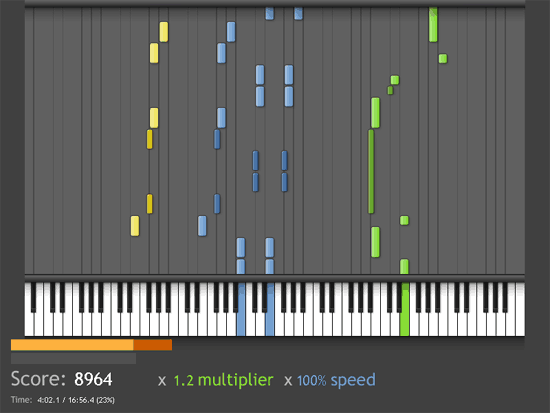
A free video game for Mac & Windows, Synthesia, is generating a lot of buzz as a sort of Guitar Hero for keyboard players.
Synthesia loosely follows the Guitar Hero format — music tracks appear visually on screen, and your challenge is to play the correct notes on a keyboard. Unlike Guitar Hero, however, Synthesia actually helps you learn how to play music using a real MIDI keyboard and MIDI song files. Several MIDI songs are included, including popular themes from video games. More are available from various sites on the Internet.
You can practice left-handed and right-handed parts separately and slow songs down if you’re having trouble with particular parts. There’s also a scoring component that judges you on accuracy and speed.
Once you’ve loaded in the MIDI track you want to play, you tell Synthesia which instrument or instruments you want to play, then click on the Play Song button, and the game begins.
The game is actually a bit more Mario Teaches Typing than Guitar Hero, but it’s free and it’s for keyboardist so give it a try and if you like it consider giving the author a bit of PayPal love.

do u know how to download songs? so u can play it on synthesia?
go to any of the many websites and recieve a free midi file download. When the option asks
run or save, click save… choose where you want it to go… if u don't know how to put it into the direct file.. click on these dropdowns…Desktop..synthesia…synthesia-r621…music…
It should end up looking like this Desktop/synthesia-r521/synthesia-r621/music………. This will download directly where it needs to be… Open the game up and play.. If you don't know how to do it as stated above then just download it to desktop… Right click the downloaded midi file. Click copy. Open your synthesia folder, and click music. Right click in the area of that page where no icons are.And click paste Open game and play… I am sorry this is so bland, but I wanted to write this so that everyone could understand… even the simplest users. Good Luck
You download .Midi files, Put them all in one folder, Then you simply select a folder to watch from the in game settings while on the song select page, Then restart Synthesia, and you should have the songs in the game.
I downloaded this, but it wont let me play the game, do i have to plug my keyboard into my computer, or what, som1 plz help me!!!
yeah u plug the midi cable into ur keyboard (piano not typing) and the usb into the comp, then go to the main page and look under input device USB uno midi interface. then go to the song and just change the track to “you play”
Where can I download MIDI-songs to the game????
Please add me and tell 🙂
[email protected]
Can I use my computer keyboard to play it?
you have to buy the training pack if you wanna slow songs down.
hey!
I just want to ask how accurate this synthesia is? so you download a midi and it shows the exact keys wich to press, or is it making mistakes sometimes? i saw a vid in youtube where a guy is playing on a piano, and it didnt seem like he was pressing the same buttons as synthesia shows it (both with same song ofc). also it seems hard sometimes to push all those keys together.
i have the app, but i dot have a keyboard yet, but iam planning on buying one.