http://www.youtube.com/watch?v=p2YhldxZIJs
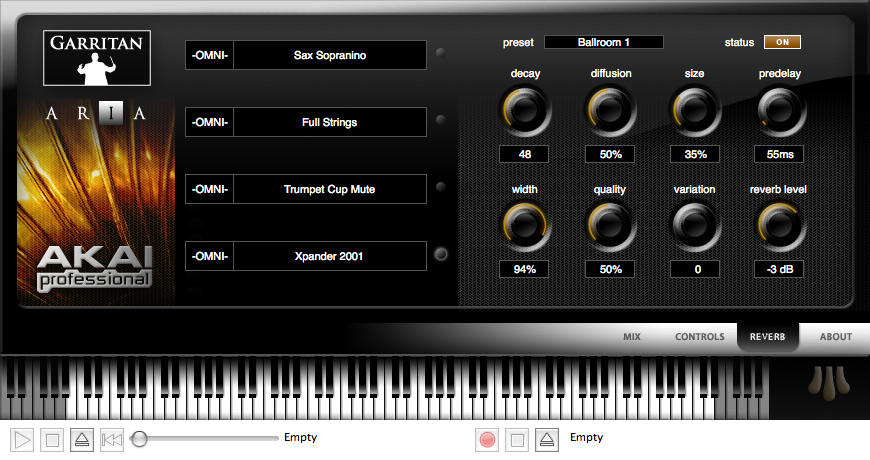
Akai‘s EWI USB is a $499.00 wind controller that features a plug-and-play USB interface for use with the included Aria software, with Garritan and Akai Professional samples as a sound source.
Features:
- Electronic wind instrument controller
- Easy to play, easy to use, and easy to own
- Powerful, flexible, and reliable
- Plug-and-play USB connection to Mac or PC
- Custom Garritan Aria Player software, contains wind instrument sounds
- Multiple fingering modes: sax, traditional EWI, flute, oboe, and EVI brass
- Expandable sound palette
- Removable, dishwasher-safe mouthpiece
Includes:
- EWI USB wind instrument
- Neck strap
- Cleaning cloth
- USB cable
- Software DVD
- Quick start guide
- Safety instructions
If you’ve used the Akai EWI USB, leave a comment!
EWI USB is Mac and PC compatible.
Professional players will find EWI USB fully capable of performance for stage and studio with a five-octave range, breath modulation with adjustable threshold, pitch bend, adjustable vibrato, transposing and octave shifting, and fingering modes to emulate various electronic and acoustic instruments. Further, the Garritan/Plogue Aria software enables instrumentalists to perform with up to four instruments selected from the full collection of over 75 orchestral, band and synthesizer sounds.
Multiple fingering modes make EWI USB model saxophone, flute and oboe, as well as traditional EWI and EVI trumpet for intuitive performance.
“With EWI USB, we are exposing the world of wind-instrument expression to a whole new world of players,” states Gregg Stein, Director of Marketing, Akai Professional. “EWI USB is the first instrument to offer professional quality at such an affordable price.”
EWI USB is now shipping to musical instrument and pro audio retailers. Available for $499.00 MSRP.
Resources:
- Official EWI USB page at Akai

I wish there was an affordable USB breath/wind controller under $100 which was simply the “You blow into it and it modulates a MIDI CC of your choice”, more suited for keyboardists who wish to wear it like the Yamaha BC-3 while playing synth lines.
I second Torley’s comment
Torley – good idea. If it was priced like the Korg nano devices, they could sell them by the truckload.
There is. The Yamaha BC3A.
around $75 streetprice.
*Edit:It has to go together with the Yamaha VL70-m module though.
The Yamaha converts it's breath signal to midi.. So that'd be more like a $700 package, unless you already own the VL70-m
Same problem here. I've tried it on all four computers in the house. Aggravating is an understatement.
I'd recommend everyone interested in the EWI to visit patchmanmusic.com!
They have a forum that specializes in all sorts of electronic wind instruments!
I can affirm Nick's sentiment above. The Garritan software is NOT ready for prime time. After playing for several minutes, the software will get stuck on one or two simultaneous notes which will play indefinitely, and the software will no longer respond to EWI input.
The only way to fix this is to restart the software (resetting the EWI hardware has no effect), or to enter Tools/Preferences and hit the OK button – which presumably reloads the Audio Device.
I have tried all kinds of variations in ASIO devices (ASIO4ALL, M-Audio ASIO), sample rates and buffer sizes, but always end up with the software getting stuck. I have also tried it on multiple machines (desktop and laptop) with the same results. Both machines are Vista SP2.
I am furthermore not impressed by the tech support. I have raised this issue several times and have not yet received the promised tech support.
Some other problems inherent with the software interface/documentation side of the EWI USB:
– The system is completely unusable unless you use an ASIO driver, yet this is completely absent in any documentation from AKAI – I pity the non-technical user who does not realize they need to download e.g. ASIO4ALL.
– You will never be able to save any of your EWI configuration parameters unless you check off the EWI-USB as a MIDI Output Device. This is completely unintuitive to me. I never checked it as I was not expecting to trigger anything in the hardware. Why not just remove the EWI USB as an output device and have it on by default, since the Save Configuration functionality is completely dependant on this?
Hi!
I just bought EWI USB and quite frankly I am rather disappointed to encounter the same problem as you all mentioned. I’ve tried to use my EWI with other programs also, not just Garritan. That does not seem to help at all. I’m now wondering should I return the product and try to get my money back!
stuck notes are caused by bad electrical circuits.
1-: Reset the device on the reset button, without touching any knobs
2-: Make sure you don't have superdry hands; if they work on a laptop's mousepad, they will work on the EWI. Otherwise get some vaseline, handlotion, or dip your hands in plain water to improve conductivity
3-: MAKE SURE YOUR BODY IS NOT GROUNDED!!!(electrically).
Playing with bare feet, on a wet floor, without rubber or isolating shoes, will cause the circuit inside the instrument to not be a closed circuit when pressing notes, and the electricity will get conducted through the body, to the ground.
If you rehearse make sure you are isolated from the ground, by wearing rubber shoes, sportshoes, flipflops, or stand on a (pref. dry and thick) carpet.
Don't sit on iron chairs that are standing on a conducting floor. Don't lean on or touch large metal plates, as they alter the human capacity and conductivity.
So it should be obvious you'd not play while taking a bath neither,,,
My EWI has developed a strange malfunction causing it to ignore most of the keys I am playing after a long period of use. I returned it for repair once and they didn't spot the fault despite having it for six weeks. It's now gone wrong again half way through a very pressured composing job.
Both Akai and Digital Village (where I bought the unit) have said all they can do is return it for re-repair. No offer to loan or replace the unit. No helpful suggestions whatsoever.
Akai professional? Yeah right.
I think ProDigit may have a point about the grounding issue but actually I think it has more to do with this device bring USB. USB MIDI instruments are notorious for having stuck note problems and it is mostly software issues. The 4000s doesn't have nearly as much trouble in this area. As for Akai's "tech support," the only thing we can really do is hit all the online arenas and start giving them bad reviews. Bottom line – if you're into the EWI on a professional level, fork over the extra cash and get the 4000s. Here's one more vote saying that the USB is not ready for the stage.
hi Nick and Brian
Do you have a solution already for this problem?
I have the same problem overhere.
Iam very interested if you solved the problem
I have experienced suck notes with the EWI USB when using Vista SP2. It got worse when I turn on MSM practically unusable. Haven't had the problem on the Mac (knock on wood) nor on my stripped down XP music disk.
Hi. I am AKAI Usb & Aria user. I got some troubles in Aria soft. In the
EWI Configuration: I cant load Sysex files,don't works "reset" baton,don't changes configuration when I change parameters.In another software velocity=120 all time. What to do? Help! Sorry my English, I'm from Russia. Thanks. [email protected]
P.S. PC Configuration: Fujitsu 6555,IntelCore2Duo,4G,Sound card-M-Audio Audiophile usb,WinXP S2
To save any of your EWI configuration parameters your first have to check off the EWI-USB as a MIDI Output Device in the device set up area. See full description from "WantsToReturnIt" above.
i do not use the Aria sounds because they are simply not good enough. If however you use the EWI USB with Sampling Modeling you get stunning results. The degree of sensitivity and control you have is just pure magic. The EWI USB is to my mind a very good buy when you have compensated for snags like having to use ASIO4ALL to get to a playable latency. Would I buy one if I knew beforehand what the EWI USB was like? For Sure!
I want to thank ProDigit for his advice on grounding. I had that problem and I tried to fix the stuck notes by smoothing the power supply, or by using different lap tops. Nothing worked untill I realised that the laptops were in a room with tiled floors. So whenever I played the EWI on a laptop the notes got stuck.(with me playing barefeett) Just by lifting my feet off the floor the notes became "Unstuck"
The stuck notes issues aren't exclusive to the USB model, this is a very common issue with the 400s and other MIDI EWIs as well. The MIDI that gets sent from these instruments is very complex, and often you'll get a NOTE ON instruction that doesn't get completed with a NOTE OFF.
It can be maddening even with high-end DAW software, nevermind the bundled Aria software, but it does sound like the Aria software needs to provide a better way to reset things. In Sonar we can play back some recorded midi until it gets a note on/note off signal, but II don't see how you can do that without recorded data, since it sounds like sending note on/off directly form the instrument doesn't cut it, so that stuck note-on is sort of "trapped" within Aria and can't really be accessed without shutting it down and restarting.
The stuck notes issues aren't exclusive to the USB model, this is a very common issue with the 400s and other MIDI EWIs as well. The MIDI that gets sent from these instruments is very complex, and often you'll get a NOTE ON instruction that doesn't get completed with a NOTE OFF.
It can be maddening even with high-end DAW software, nevermind the bundled Aria software, but it does sound like the Aria software needs to provide a better way to reset things. In Sonar we can play back some recorded midi until it gets a note on/note off signal, but II don't see how you can do that without recorded data, since it sounds like sending note on/off directly form the instrument doesn't cut it, so that stuck note-on is sort of "trapped" within Aria and can't really be accessed without shutting it down and restarting.
The stuck notes issues aren't exclusive to the USB model, this is a very common issue with the 400s and other MIDI EWIs as well. The MIDI that gets sent from these instruments is very complex, and often you'll get a NOTE ON instruction that doesn't get completed with a NOTE OFF.
It can be maddening even with high-end DAW software, nevermind the bundled Aria software, but it does sound like the Aria software needs to provide a better way to reset things. In Sonar we can play back some recorded midi until it gets a note on/note off signal, but II don't see how you can do that without recorded data, since it sounds like sending note on/off directly form the instrument doesn't cut it, so that stuck note-on is sort of "trapped" within Aria and can't really be accessed without shutting it down and restarting.
Have you tried resetting the EWI? Also, wiping it down, make sure you're touching all the ground plates, and make sure your hands have a little bit of lotion on them.. to make good contact. Reset the EWI by holding down the reset button until the light stops blinking. Make sure you're not touching any metal parts while doing this.
Have you tried resetting the EWI? Also, wiping it down, make sure you're touching all the ground plates, and make sure your hands have a little bit of lotion on them.. to make good contact. Reset the EWI by holding down the reset button until the light stops blinking. Make sure you're not touching any metal parts while doing this.
Had the same note sticking problem with the EWI USB. turns out it was my laptop processor which wasn’t fast enough. bought a macbook pro and have never had it happen again. not once. play it daily. all in the processor speed.
Just got my EWI USB today. I am using the ARIA software on Macbook Pro 2.4 w/ Snow Leopard and everything worked fine. no stuck notes or software problems. The Garitan sounds can be better of course but thats the whole point of using an EWI is the ability to connect it to anything you want. I also connected the EWI to a G5 running Tiger and had no problems. I didn't install software or anything. just plugged in the USB and it was recognized as a MIDI controller. You will need the Aria software though to get at any of the configuration setting for the EWI, fingering ect. I am using the EVI fingerings and there is alot of adjustment from playing a trumpet but its not has bad as i was expecting.
Dear Derick
Garritan Aria is the only software that lets you configure the EWI USB according to http://www.EWIUSB.com. Sure Konkakt Player of Sample Modeling does recognise EWI USB as a MIDI wind controller, therefore Kontakt Player + EWI USB can be stand alone instrument.
Best if Garritan Aria can act as host synth and configure the EWI USB. This combination then , accepts the MIDEWI I USB input and then then its MIDI output is then somehow internally routed to Kontakt Player 2 with the latter as a plug-in. http://www.patchmanmusic.com claims that the Garritan Ariais capable of driving another soft synth.
But how?
Dr. Charles WONG
[email protected]
.
Hi _ just to add to the debate _ i get the freezing/sticking issue with a high end laptop running vista sp1 32 bit but not at all on a workstation desktop running win7 64 bit…. same instrument! _ while i have no real clue why i suspect a driver issue and am about to load win 7 into the laptop as soon as i can afford another licence and will post again if the problem dissappears when i use the laptop
thanks for the advice ALL
best wishes
anthony
hey ragman, I've had the same problem with ignored notes. The only thing that works is unscrewing the ewi, taking it apart, then putting it back together, but this only lasts for a while before the problem returns, weird. Have you had any luck finding a solution/repair?
I Got one plays nice as heck no grounding issues. Aria player is weak not very good sounding luckily kontakt library sample modeling massive are sounding great best 300$ instrument I have ever bought highly recommended. If you search for diggler on patchmans wind controller forum you will find my free presets and solutions for ewi have fun.
Actually, there is a simple solution for this: the problem comes from bad communication between the main PCB and the top contacts (i.e. the keys). All you need to do is to open your EWI and put some Kontakt spray in the socket, then wait a couple of minutes and close it. You'll be done 😉
Hi. Can you tell me how to configure the Kontakt Player to use with the Akai Ewi Usb and Mr. Sax T? I’m getting crazy.
Thanks.
I tried my EWI USB on many computers with windows XP or 7 but it doesn’t work (device not recognized by the computers). Should I buy a Mac?
Over at KVR there seems to be a new announcement about a TEC USB MIDI Breath Controller
http://news.hitsquad.com/
Hi, does aria and the ewi usb work with win7 64bit?
Or is that an discontinued model? only xp???
howdy, I am a 57 year old composer and I just got the EWI USB and I am a fanatic about it—it beats any keyboard I have tried and I have tried them all. All the complaints listed above are quite valid but I wonder if this AXE might just work better under WINDOWS 10—-which was just installed yesterday—but I was getting pretty good results. Getting the ARIA player to behave can be quite tedious—I also have PERSONAL ORCH and WORLD INSTRUMENTS—-even using my nice Yamaha digital piano as a controller, upon occasion, the sounds just start freaking out and getting all buzy and I can come up with no solution but to restart the ARIA no matter what axe I am using.
I tweaked all the sounds to best work with my playing style.
Sadly, I do not think I would ever use this for a live show, but in the studio it is awesome.
I have tried every wind synth (I think) and for some reason this is my favorite—–if you are not getting the best sounds, give yourself a little time.
I’ve got quite a collection of noise generating modules (synths) and the EWI USB does an incredible job of playing properly programmed synths.
I am on a very limited budget and my studio is in my apartment, but I am already saving up for a wireless model, but that will not diminish my love for the EWI USB
I purchased mine at a shop (be glad to tell you which) where the unit was slightly tweaked a bit.
Even with the less than stellar sounds that come with the unit, I was able to toss together 18 tracks of EWI——well my friends knew it was a wind axe because that is what I do—and I was able to impress an acoustical crowd who don’t normally like synths
The Ewi usb is so easy to use with ubuntu linux carla software. Plug & play after you have installed some VST’s. you don’t need drivers or to buy expensive software to run it.