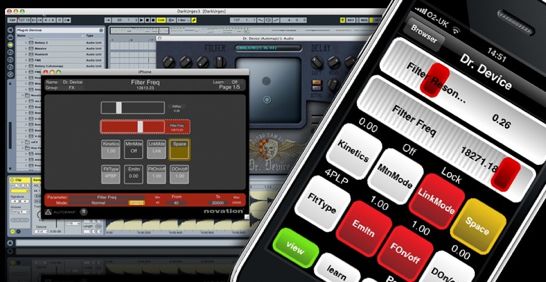
Novation has announced Novation Automap for iPhone and iPod touch, a new application that turns your device into a multi-touch MIDI controller.
Description:
The power behind Novation’s SL MkII, SL Compact and Nocturn MIDI controllers is now available for your iPhone / iPod touch, providing an instant and intelligent, wireless, palm-sized MIDI controller. Now you can use iPhone / iPod touch to control all of your music making software.
Whenever you want to control music software and the mouse is out of reach, Automap for iPhone / iPod touch delivers. And the possibilities are endless, give your artist remote control of reverb levels; a hand-held cross-fader for laptop DJ’ing; controlling multi-effects whilst tracking guitar; switching drum kits whilst you’re sat at your V-drums.
The Automap for iPhone / iPod touch app will be available to buy from the Apple app store in July. Combined with Novation’s free Automap 3 Standard software, or Automap 3 PRO, it provides two horizontal faders and eight buttons per page, displayed on a single iPhone / iPod touch screen. However, the number of pages and thus the number of controls is unlimited.
Automap lets you see at a glance how every control on your iPhone / iPod touch is assigned, both on the iPhone / iPod touch itself, and across your computer screen. Combining all this visual feedback with intelligent software browsing also helps you get to the right software fast! Control maps are automatically placed into categories depending on type (instrument, effects, mixer and so on) for quick and easy browsing and selection.
Although Automap automatically and intelligently maps to all major music making software, you will inevitably have your own unique way of working. Consequently, editing maps and re-assigning controls in Automap is extremely quick and easy. Simply click a parameter in learn mode, then touch a control on your iPhone / iPod touch to assign it. Double-clicking ‘learn’ allows you to ‘Click-Touch-Assign’ in quick succession.
Using your iPhone / iPod touch with Automap 3 PRO (available to buy from www.focusrite-estore.com) delivers some extremely powerful additional features.
Firstly, it harnesses the shortcut power of your QWERTY keyboard. It then allows you to assign almost any computer keyboard shortcut, and combinations thereof, to any of the controls on your iPhone / iPod touch. Editing maps is also improved, allowing you to simply drag parameters in the Automap Heads-up GUI from one control to another. Finally, with PRO you can use your iPhone / iPod touch alongside any other Automap compatible hardware controller and it’s all perfectly integrated for seamless control.
Details below.
Key features
- MIDI CONTROL IN YOUR PALM
Now you can turn your iPhone / iPod touch into a MIDI controller, with multiple faders and buttons easily assigned to parameters in any software that allows MIDI control, and even some that don’t! - AUTOMATIC PLUG-IN MAPPING
Instant, wireless, palm-sized control of all automatable VST, AU or Pro Tools format plug-ins in any DAW. - INSTANT VISUAL FEEDBACK
See at a glance how every control on your iPhone / iPod touch is assigned, both on the iPhone / iPod touch itself, and across your computer screen - LEARN AND CLEAR MODES
Make and delete assignments directly from your computer screen using lightening-fast ‘Click-Touch-Assign’ facilities. - AUTOMATIC MIXER CONTROL
Ideal for remote track arming and muting, transport and master level controls in a growing number of supported DAWs. (Control these elements in non-supported DAWs using separate dedicated Automap systems, or your own custom mappings.) - PLUG-IN AND MIXER MAP BROWSING FACILITY
- Get to the right software fast! Control maps are automatically placed into categories depending on type (instrument, mixer etc.) for quick and easy browsing and selection with hardware or software.
Features exclusive to PRO
- KEYSTROKE ASSIGNMENTS
Place the shortcut power of your QWERTY keyboard in your iPhone / iPod touch. Automap 3 PRO can assign almost any computer keyboard shortcut, and combinations thereof. - MULTIPLE DEVICE SUPPORT
Use your iPhone / iPod touch alongside any other Automap compatible hardware controller, perfectly integrated for seamless control. - DRAG AND DROP
- Make control re-assignments directly from your computer screen by simply dragging and dropping controls from within the Automap heads-up GUI.

Simply FANTASTIC, can not wait… :))
are you going to have to be connected through wifi to use?