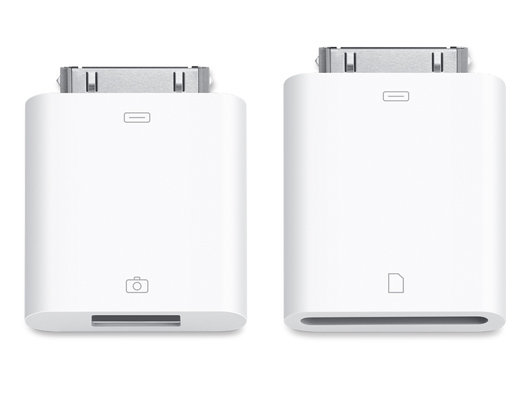
With the release of iOS 4.2, there has been a surge of interest in using the Apple iPad with hardware MIDI controllers.
While Apple has not hyped MIDI in iOS 4.2, class-compliant USB MIDI devices are expected to work, if they are low-power or self-powered, when connected to using the iPad Camera Connection Kit.
Unfortunately, there’s no official Apple list of compatible devices and the company hasn’t said that much about MIDI support in iOS 4.2. Here’s a list of devices that are thought to be compatible, based on user reports.
iPad Compatible MIDI Devices
- Akai LPD8
- Akai LPK25
- Alesis Q49
- Behringer BCF2000
- Behringer BCR2000
- Behringer UMA25S
- Digitech GNX4 (audio & MIDI)
- E-MU Xmidi 2×2
- EDIROL PCR-M80
- Elektron TM-1
- ESI Midimate II
- Korg K25
- Korg nanoKEY, nanoPAD & nanoControl
- Korg Triton TR Series
- M-Audio Axiom Pro 61
- M-Audio Prokeys Sono 61
- M-Audio Uno 1×1
- Novation Remote 25 LE
- Novation Remote SL-37
- Novation Xio 25 (audio & MIDI)
- Sonuus i2M Musicport
This list is via iOSMIDI, which focuses on this topic.
If you’ve got experience to share, using the iPad with USB MIDI controllers, leave a comment!

And a few more…
CME U2Midi
Novation Remote 25 SL
+ Waldorf Blofeld 🙂
i'm sorry… Is iphone 4 with 4.2.1 iOS compatible?
I'm running 4.2.1 on my phone now. I need to get one of these to test.
Anyone try using this with NanoStudio?
Reminder: the Camera Kit works on iPad only, the iPhone doesn't recognize it.
ps.: Emu XMidi 1×1 interface works, tested with Mopho Keyboard and Midi Monitor, everything goes through, both ways. Now bring on the crazy apps!
I've got an older USB MidiSport 2×2 (the green one). It does not work. FYI.
My Edirol PCR-30 doesn´t work here 🙁 Time to update to a bigger on 🙂
been using the $79 Rockband 3 keytar through an M-Audio UNO 1×1… ribbon controller works great and easily customizable to any parameter within certain apps i.e. MiniSynth PRO. it's also worth noting that Best Buy's dopest keyboards aren't in the keyboard aisle…
M-Audio UNO 1×1 FTW!
blah blah blah apple ipad hipster wank cockface, so shiny I want one, dammnit you've got me again
I have an LPK25 and I can't get it to work on my iPad with MiniSynth Pro. Midi Monitor sees it, so I know it's working on some level, but MiniSynth Pro won't make a sound. (It does pop up a message saying that it's detected a MIDI device when I plug it in, but it doesn't detect any keypresses)
anyone have any luck with the M-Audio Axiom 25? with an AC adapter plugged in, i still get a USB power error on the iPad when i connect the Axiom.
M-Audio Oxygen V2 doesn't seem to work either…fuckers
The iPad with the camera kit works with the Roland GI-20 midi guitar controller and
NLog Pro iPad synth. I set the GI-20 for the generic midi driver, and the NLog to receive on all channels. You have to fool a bit with envelopes, but both single notes and chords work.
ditto.
Roland FP7 works great …
hello
can you please advise how to connect properly Roland FP7 with camera connection kit and ipad2, i mean which midi cable interface to use (UM-ONE not working according to isomidi site)
thanks in advance for your advice
marc
Edirol PC-50 with Xewton MusicStudio works perfectly … but PC-50 and MiniSynth Pro is a disaster – buggy buggy buggy … ergo: the right software makes the differents – hardware should be tested again with updated or new apps …
Anyone had any luck with Roland fantom x?
The M-Audio Oxygen 25 works great with the iPad via the camera Connect kit (runs just fine off BUS power – no AC adapter or batteries needed). Just a reminder you will need to upgrade to the latest iOS before the iPad will recognize MIDI. I use this to control the Korg iMS 20 on my iPad.
I can't get the korg k25 to work. I keep getting the power error. I've tried plugging in the controller with the dc power supply, but it doesn't seem to output via USB at that point. I guess I need to try a powered USB hub. Anyone else try the k25?
@Ole the PCR-30 does work, I have one myself!
Grab the manual here: http://www.roland.com/products/en/_support/om.cfm…
Then go to page 156 and follow the instructions. You need to put the driver into Generic mode.
Pat
iOSMidi.com
@Ole the PCR-30 does work, I have one myself!
Grab the manual here: http://www.roland.com/products/en/_support/om.cfm…
Then go to page 156 and follow the instructions. You need to put the driver into Generic mode.
Pat
iOSMidi.com
@Ole the PCR-30 does work, I have one myself!
Grab the manual here: http://www.roland.com/products/en/_support/om.cfm…
Then go to page 156 and follow the instructions. You need to put the driver into Generic mode.
Pat
iOSMidi.com
@Ole the PCR-30 does work, I have one myself!
Grab the manual here: http://www.roland.com/products/en/_support/om.cfm…
Then go to page 156 and follow the instructions. You need to put the driver into Generic mode.
Pat
iOSMidi.com
@Ole the PCR-30 does work, I have one myself!
Grab the manual here: http://www.roland.com/products/en/_support/om.cfm…
Then go to page 156 and follow the instructions. You need to put the driver into Generic mode.
Pat
iOSMidi.com
@Ole the PCR-30 does work, I have one myself!
Grab the manual here: http://www.roland.com/products/en/_support/om.cfm…
Then go to page 156 and follow the instructions. You need to put the driver into Generic mode.
Pat
iOSMidi.com
M-Audio Ozone (plugged in) does not work when USB plugged into Camera Connection kit adapter. Tried starting iMS-20 afterwards as well.
Edirol UM1-SX works fine
Novation nio doesn't workshop, but korg NANO controllers(tested nanoPAD and nanoKONTROL with midimonitor)
You rock guitar works with nlog pro, music studio, symphonix and korg synth
I'm running a korg m50 with xewton and the korg apps and it works great.
Edirol PCR-1 and PCR-M1 both work (may require USB hub)
How about M-Audio Fast Track with iPad2?
Akai mpk49 works! (may require USB hub). One may assume that the other mpk form factors would also work.
BTW, the USB driver setting must be set to "Generic" on both of these. PCR docs show you how to do that
Are you running iOS 4.2.1 or 3.2.?, i have a nanokontrol and an iPad with iOS 4.2.1, just need the camera conection kit, but i wont buy it unless it shurely works.
My M-AUDIO Keystation 49e works with NanoStudio (but only with external power on)
The PCR-M30 does work when selecting USB as generic. However, there will still be problems as the iPad will complain that there is not enough power so a powered USB hub or external power supply is needed.
Edirol PCR-M30 needs powered USB hub or external power supply for it to work with iPad
Livid Instruments Ohm64 and block work with the iPad using a powered usb hub…
Thanks!
axiom 25 1st generation will work if you connect a self powered usb hub between the ipad and the axiom. I used a cheap belkin 4 port hub and it works great. with a direct connection, even running the axiom25 on its own power supply, you will get usb power error on ipad.
CME M-Key works perfectly well!
I can confirm the CME M-Key is indeed working with the latest version of GarageBand running on an iPad Mini 2 connected with the Apple Lightning-to-USB Camera Adapter, though it must be powered externally via its wall-wart adapter. Pretty awesome though!!!
What about edirol pcr-500? Any insight would help.
Has anyone tried it with the hammond XLK-3 (the lower part of the xk3) – dont get my ipad for 2 weeks and want to know!!
Axiom 25 (1st gen) works fine using a power cube and a non-powered USB hub (i'm using Targus model ACH114EU).
My PRC-M30 also needed to be set to MIDI I/F mode off for it to work.
I didn't get my FP-2 to work even when setting it to Generic MIDI mode.
Eventually the FP-2 worked fine. Don't know what I did, but now it works like a charm.
So what about the MAudio Axiom Pro 49? Can my iPad not work with it?
Have tried just the USB and it doesn’t work – says it needs power.
Check: http://iosmidi.com/devices/ for full list of compatible midi keyboards.
Have tried just the USB and it doesn’t work – says it needs power.
Check: http://iosmidi.com/devices/ for full list of compatible midi keyboards.
Have tried just the USB and it doesn’t work – says it needs power.
Check: http://iosmidi.com/devices/ for full list of compatible midi keyboards.
Have tried just the USB and it doesn’t work – says it needs power.
Check: http://iosmidi.com/devices/ for full list of compatible midi keyboards.
Have tried just the USB and it doesn’t work – says it needs power.
Check: http://iosmidi.com/devices/ for full list of compatible midi keyboards.
Have tried just the USB and it doesn’t work – says it needs power.
Check: http://iosmidi.com/devices/ for full list of compatible midi keyboards.
I am looking for a compatible 88 key controller to use with iPad GarageBand and Sunrizer Synth apps. Does anyone know if M Audios Keystation 88es works with them and is it a direct connect or is something like the MidiMobilizer needed.
I have just tried my keystation pro 88 with garage band and its a no goer may have to get a powered hub although the k/s is poweredif anyone has any more info please let me know , stevo
Buy a $19 USB hub and route through it. The iPad works fine then with all power hungry USB devices!
Alesis micron works
Hi! you can fix your problem to connect M-Audio OZONE into ipad? if you can fix let me know. cause i got the same problem =( my email is renaton at gmail.com
In case anyone IS interested, the M Audio Keystation 86es works like a charm with GarageBand, Sunrizer Synth and Korg iMS-20. With the iPad camera connection, it is plug and play. AWESOME
Do you use additional external power? My key station 61es was powered but not responding to iPad mini garage band
Does it work with boss gt 10 ???
I’m testing that today
Does the IPad function with the Roland Fantom g8!????thanks
Seems most Roland stuff is easy n compatible
Hmmm interesting wonder what makes it compatible or not. I thought its almost always possible to us MIDI controllers to interface with the IPAD
Roland cakewalk a500 pro doesnt work, only controllers without a driver will work
Devices tested so far:
Oxygen 49 1st gen – Working whit powered usb hub.
Esi maya 44 usb – Not working
Numark dj2go – Working
JamMate RockFrog – Working
Zomm G2.1U – Working (only audio in)
M-Audio X-session (Evolution UC-17) – Working
Denon HC4500 – Working (Midi Only)
Alesis Multimix8 USB 2.0 – Not working
Did you get it working with djay for the iPad or with another software?
Sorry I forgot to include that I was asking about the DJ2GO.
Maya44 USB is working well when you use a powered USB hub.
Thought I had a problem with Alesis MultiMix 4 USB, but it turns out the iPad is handing off audio out through USB back to the mixer. Plugged in phones, turned up phones volume, and ta-daaaa! Audio.
Alesis MultiMix 4 USB > powered USB 3 hub > Apple Lightning to USB 3 Camera Kit.> iPad Pro 12.5″
M-Audio Axiom 49 2nd gen. > powered USB 3 hub > etc
Hear GarageBand instruments through phones in mixer.
Note: Axiom Quick Start Guide says USB MIDI controller should be powered by external power supply only for live performance when controlling another device via MIDI. Power supply should NOT be used when connected to USB.
My Novation X-Station61 and Korg MicroX both work
on iPad2+Camera connection kit.
MS-20ic USB MIDI controller running korg legacy cell, low usb power issues.
Even though Korg think it works!
X-station 61 audio and midi works on a powered USB hub.
I’ve had success with the korg microstation direct to camera connection. Didn’t get XmStation working but will try again with powered hub after reading above comments. Thanks
Sorry forgot to mention this is on latest IPad (3)…
Tried behringer umx250 with 9v supply (! +&- not as usual)
Worked fine with iPad and Cam connection, but also midi-out behringer=midi-through and makes midi-out iPad availiable with midi cable
Novation X-Station 25 works fine unpowered directly into camera connection kit and both audio and midi work. It says not compatible when you plug it in but then it just works. Strange yet beautiful!
I made some tests with my iPad Mini & a Lightning Camera connect kit:
– Akai SynthStation 25: No go, even on batteries, powered usb hub required.
– Arturia 61 key Universal keyboard controller: No go, even with a AC adapter, powered usb hub required.
– Korg Micro Key 37: No go, powered usb hub required.
It’s a real pain in the @ss to find a good keyboard that can be plugged directly to the iPad without external power supplies/hub.
I’m now waiting for the Novation LaunchKey or the Arturia MiniLab: those should work correctly with the iPad.
There’s another possibility: the Samson Carbon is made to work with the iPad and is available & cheap, but I personally hate the look of it.
Could anybody please say about M Audio keyastation 49e on Ipad 2
I just got a new M-Audio Keyrig 49 and it will not work with my iPad 3. What I want to know is: HOW do you use a powered USB hub to do this? There is no jack for an external power supply on this new Keyrig 49 – only USB, that small square USB jack (I don’t know what it’s called) — the other end of its cable is “regular” USB that plugs into the camera connection kit. Do I plug that USB instead into the powered hub and then run another USB cable from the hub to the camera connection kit and this will somehow connect the keyboard to the iPad? It’s not clear to me how this is going to work. Thanks.
How about for the Ipad 4th gen. Lots of the ones that used to work on 3rd 2nd and 1st gen are no longer supported such as my Roland A-88. Also even when I have my axiom 49 plugged into the wall it still says it takes too much power. Kinda irritated cuz I bought my ipad 4 specifically for this!
BUUUUMMMERRRR
Just Tried my 1st gen Nano keys and it worked great with Garage band
The IOSMIDI/devices link is dead… but in case you want to take a look at the full list of compatible midi devices, you can still do it through web.archive.org. This is the last snapshot they took before the link went down.
http://web.archive.org/web/20130121040234/itms://itunes.apple.com/us/app/midi-monitor/id395750746?mt=8
Cheers
I’m sorry. Wrong link on the last message. This is the link to the full list of compatible midi devices.
http://web.archive.org/web/20130121040234/http://iosmidi.com/devices/
korg padkontrol works too complete with its midi i/o interface which is visible on the ipad in any list of available midi ports and can be used independently of the padkontrol’s own controls
It has the ability to record, sequence, and mix
tracks. The lid tends to make a squeaking sound and the keys are quite noisy.
Many digital pianos include different voices, such as whistles,
guitar, and other non-piano voices, and some even come with alternate tunings, variable
harmonics, and adjustable decay, or fading lengths.
You can add Akai MPK Mini to the list, it does work too with iPad. And does a great job using Akai app or Garageband with USB camera connection kit
Yamaha kx 25 does not work either
– Please add M-Audio KeyRig 49 to the list. I have used it with garageband, SampleWiz and C3B3 (Hammond organ emulator)
– Also Yamaha Motif XS works fine with iPad
Has anyone tried Behringer U-Control UMA25S interface for recording on the iPad?
Cheers & thanks!
I’ve done a little hands-on research with my iPad 2 (full-size, pre-retina) + 30-pin Camera Connection Kit + USB cable at a Guitar Center to determine which devices are able to not only interface with an iPad, but also be powered by it.
These are the keyboards I was able to interface and power via only my iPad (they were not plugged into to any other power):
– Alesis V61
– Novation Launchkey 49
– Samson Graphite 49
These are not (wouldn’t power up):
– Alesis VI49
– AKAI MPK249
– M-Audio Axiom Air (forgot whether this was 49 or 61 keys)
For those gadgets that wouldn’t power up, maybe there’s some obscure way to put them into a low-power iPad-friendly mode. I didn’t read the manuals, just tried to turn them on.
I’m guessing for most models, the 49 key versions and 61 key versions will work the same way, unless the 61 key version adds more display/blinky light power consuming features.
-Aaron
Would love to hear why the HELL an Oxygen 61 will connect but an Oxygen 49 — one powered by its own external adapter no less — is refused by the iPad. It makes no sense on the face of it, unless Apple decided to do its own initial testing and then put its own go-list / ban-list directly in the goddamn firmware of the iPad. Which is inexcusable, thank you very much.
*swearing profusely*
Talia – may be you got lucky with the Oxygen 61. M-Audio Axiom Gen 2 Quick Start Guide says to use external power supply only when using MIDI to control another device “live”. Specifically says NOT to use power supply when connected via USB. I’m using a powered USB 3 hub to power the Axiom 49 G2 into iPad Pro 12.5″