patch editor
Articles about patch editor:
Moog has announced the VST Little Phatty Editor, a VSTi application that provides full control and editing of Little Phatty presets and performance controls via MIDI, from within your VST-compatible host application.
The following actions are supported:
- Full editing of all Little Phatty preset parameters via MIDI CC messages
- Automation of all LP parameters in real time through the VST host application
- Save/Load presets to and from the Little Phatty
- Presets can be saved in VST Editor format
Supported VST Hosts:
PC – Windows – VST 2.4
- Steinberg Cubase SX 1-3, Nuendo 1-2
- Mackie Tracktion 3
- Imageline FL Studio (Fruity Loops) *see issues below
- Energy XT
- Cockos Reaper 3.11
- Presonus Studio-One
- Plogue Bidule
- Tobybears’ MiniHost
- Hermann Sieb’s VST Host
Mac – VST 2.4 (OSX)
- Steinberg Cubase SX, Nuendo
- Plogue Bidule
- Mackie Tracktion
- Cockos Reaper 3.11
- Presonus Studio-One
VST Little Phatty Editor for PC and Mac is available now for $69 USD.
Free Waldorf MicroWave Editors

Free Waldorf MicroWave synthesizer editors for Mac are available at 12decode:
There is an editor for the original Microwave (aka Microwave I, with software version 2.0 installed) and an editor for the Microwave II (including the XT line).
The sound generating architecture of the Microwave II is very similar to the MicroWave I, except the different concept with the “modulation matrix” and the possibility to change many parameters simply by control change messages and by turning the little knobs manually, so system exclusive programming may not be so important.
Nevertheless, I think it is always a nice feature to get control over the wave control tables, because these nitty gritty 8-bit samples are that, what makes these old synthesizers finally unique.
Another main feature that has been build into version 4.0 was the library centered sound program design. While it is nice to edit any parameter of a sound, it is even more practical to have an overview of all available sounds and also be able to save/restore them at any time.
If you’ve used these free editors, leave a comment with your thoughts!
Free Mac Yamaha DX7 Librarian
DX7 Librarian is a free Macintosh program for managing voice data for the Yamaha DX7 synthesizer.
Features
Any voice parameter can be changed on Editor window having direct connection with DX7 over MIDI.
If your Macintosh have a connection with the Internet, you can access to “DX7 Librarian Official Database”. Double clicking on a file in Database window, you can get the voice file on your Mac! As you can see in the voice list here, the total number of registered voices is 14566 as of today.
You can submit your original voice file via e-mail just by choosing Submit item in File menu. Then the file will be appended into the Database within a few days. Read more…

Moog Music has chosen ReKon Audio to develop a new VST editor for their Little Phatty analog synthesizer.
“We have had several requests for such an editor.” said Amos Gaynes, Product Engineer for Moog Music.
The new addition to the Moog product line will bring complete control inside a VST host to Moog Little Phatty users. The new editor will be able to both save and recall preset sound patches and banks in both the VST (.fxb/.fxp) and native System Exclusive (.syx) formats.
Moog Music plans to release the VST Little Phatty Editor in Early Spring 2009.
VST Little Phatty Editor features:
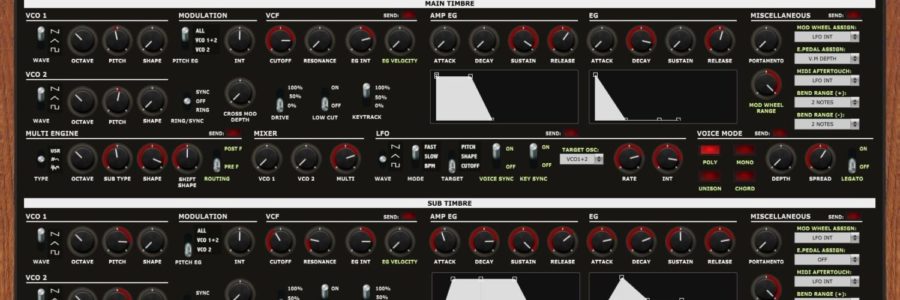
- View and edit every available parameter in one view
- Automate and shape patches along with the music… in the DAW
- Intuitive user interface that emulates the real gear’s appearance
- Save and recall patches in .FXB/.FXP and .SYX formats
- Available as a VST 2.4 plug-in for Mac OSX and Windows PC

micronAU is an audio unit that lets you fully control and automate the Alesis Micron synthesizer.
This audio unit provides an interface through which the entire sound generation engine of the Mircon can be controlled in real time. In addition, all parameter settings are saved when the track/DAW hosting micronAU is saved.
When one reloads a track hosting mirconAU, the settings are restored, thus avoiding the “what patch did I use for this track” syndrome. Furthermore, if one’s DAW supports automation of plugin parameters, all of the Micron’s parameters can be automated and controlled by any of the DAW’s supported control surfaces.
micronAU is being distributed as donationware.