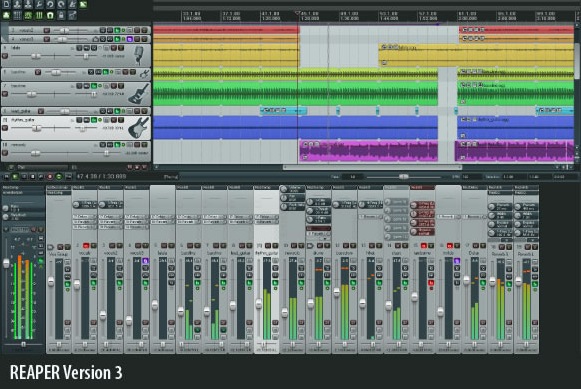
Cockos Reaper may be the world’s most unfortunately named digital audio workstation – but they’ve keep updating it anyway.
Here’s what’s new in Reaper 3.0:
New Features:
- Automation lanes.
- Nested track folders.
- Multiple tabbed projects.
- Multichannel (greater than stereo) media support, including MOGG.
- FX parameter controls on track and mixer control panels.
- Customize toolbar icons and actions.
- Programmable MIDI joystick/game controller support.
MIDI Improvements:
- Inline MIDI editing.
- Edit multiple MIDI items in one editor.
- Sync MIDI editor to arrange view, including looped items.
- Export project MIDI, with tempo map support.
- MIDI event filter.
- Track MIDI controls (manage bank/program changes, sysex, automate CC).
- MIDI hardware timing improvements.
- Full sysex support.
Other Significant New Features And Improvements:
- Create time- or beat-based templates including media.
- Improved REX support.
- Smoother play/stop/seek transitions.
- Soft controller takeover, including FX parameters.
- Create default FX controller assignments that act on the focused plug-in.
- New UI theme, many new graphics features and options.
- More user control of placement/appearance of graphical interface elements.
- Create knobs, envelopes, controller assignments from the last touched FX parameter.
- MIDI control of presets for any plug-in.
- Attach text and image resources to media items, place icons on tracks.
- Global automation override/bypass.
- Hide/show tracks in either arrange or mixer view.
- UAD compatibility improvements.
- All-native graphics rendering engine (better appearance and performance).
- Memory use improvements.
Cockos Reaper 3 is available now for Windows and Windows 64 and Mac OS X Intel and PPC. Cockos offers two licenses, depending on how you use it:
- $225: full commercial license.
- $60: discounted license.
If you’ve used Cockos Reaper, leave a comment with your thoughts!
Cockos Reaper 3.0 details below:
Audio Performance:
- Improved MP3 seek accuracy.
- 27.97DF timing improvements.
- Read, write, or explode media with any number of audio channels.
- Optionally preserve project PDC when monitoring.
- Seamless media item glue during playback.
- Optional tiny fade to hardware on play/stop/seek (avoid clicks).
- Option to gate (not record near-silence) while saving live audio output.
- More WAV read/write options.
- Customizable pre-roll, metronome improvements.
Arrange View / Editing:
- Optionally draw labels and buttons above media items (track info lane).
- JS support for up to 64 parameters, dynamic UI.
- Filter track visibility by name.
- Optionally display faint peaks in automation lanes.
- Control+drag for fine adjustment of volume handles and envelope points.
- When labels drawn above items, drag the label area to select item+time.
- Dynamic split detection improvements.
- Drag images onto arrange view or track control panels.
- Filter and highlight FX parameters in the envelope window.
- Automap 3.0 support.
MIDI Editing:
- Vastly improved memory performance with many MIDI items in a project.
- Editor timeline can be beats (local), beats (project), time, or synced-to-arrange.
- Switch active MIDI item in multi-item editors by clicking a note, selecting the source item in the MIDI event filter, or clicking the item in the arrange view.
- Quantize/humanize/edit note properties modelessly.
- Increased range for note velocity handle adjustment.
- Improved timing in ReWire slave mode.
- Enhanced CC meta-actions (fine-tune custom actions with a controller).
- Themeable colormaps for note velocity, channel, source item.
- Lock notes in time or pitch.
- Adjust parent item and loop length from MIDI editor.
Plug-ins:
- No glitch when looping plugins that generate sound or tails.
- Faster redraws for some VSTs.
- No glitch when automating ReaEQ band gain through +0 dB.
- Dragging FX instrument to empty track space inserts new track for the instrument.
- Improved FXP compatibility.
- Support for VSTs that send MIDI out of context.
- Improved DX automation support.
- FX parameter aliasing.
Random Stuff:
- Many theme options for drawing blend modes, marquee selection.
- Unicode (via UTF-8) filename support.

Frankly, this isn't worth a shit. I just tried the demo and, after spending at least ten minutes trying to get it set up to communicate with my MIDI keyboard, found that it doesn't. Period. Worthless crap. As for the so-called VST support, I couldn't even get it to find my VST plugins, let alone load any of them. No, thanks. I'll stick with Acoustica Mixcraft 4.0, which blows this piece of crap away and costs $155 less.
With all due respect Gary, you are doing yourself and everyone else a disservice by say this. I have been using reaper for the last 2 years and it is the best DAW out there in my opinion.
Both in terms of audio editing and Midi. I don't know what your doing wrong but reaper will find vst's easily. i can not express highly enough how good reaper is. It is heads and shoulders above any other software I've used. everyone should download the demo and see what these guys are doing over at Cockos. they are so ahead of the game it's not funny.
Got to say, Reaper is a fun change of pace from Logic and Pro Tools which I've used for years. I can understand getting frustrated with it, as it handles a lot of tasks different than some other DAW's but if any new software is a TIME INVESTMENT.
It's great when things just turn on and do what we want, but tuning a technical tool to meet the needs of a creative process requires flexibility – not pre-programmed functionality. Reaper's Action List lets you see all sorts of key commands, even customize the keystrokes.
Beyond that it helps you build entire workflows. You can combine actions and commands in to larger macros that operate on at the touch of a button.
Example: Sure Reaper doesnt have an "export region" function as such. But if you're thoughtful about it, then it's pretty simple. Here's one custom action to accomplish exporting regions (exporting audio on just one track of a multi-track project):
1) Track: Unmute All Tracks
2) Track: Unsolo All Tracks
3) Track: Toggle Solo for Last Touched Track
4) File->Render project to disk…
I setup this action on "E" and now to do quick audio edits and export i just have to make my edits, select a region by clicking or dragging and hit E.
The Render window opens up and i choose "render time selection" and all the other tracks are already muted.
Seriously – if Reaper doesnt do something you wish it did…there's probably a way to get it done. Just have to look hard. OH and i'm still on evaluation license because i'm trying to determine if it will really work for me (they let you demo it for as long as you need).
anyway, one my writers (i'm the lead editor for AskASoundGuy.com) has some videos and other stuff about Reaper in action.
Frankly, from this opinion I can deduce that you couldn't find your own ass with both hands behind your back and very simple instructions.
Incidentally. If you choose File>Render and select the 'render stems' option box it will render only the selected tracks without having to mute or solo anything.
I think if Gary spent all of 10 minutes to setting up his keyboard, that tells you how much commitment he really has in learning a new piece of software. It's clearly a comment by a troll.
Just to say reaper is fantastic. Drag and drop plug ins, vsti’s can be chained together easily, midi is great and sound quality incredible.
You need to learn it but it is the most forward thinking of all daw.
also the effects can be edited in code (jesussonic) Try out the transient plug ins. fantastic stuff. Reaper is the BEST!!!!! buy it now!
also if you got lots of plugs you can search by name and type. Stick that in your pipe steinborg!
I just went from Ableton Live to Reaper. I learned how to get around Reaper in less than 2 hours and love everything about it. After using Ableton Live for 2 years, I had to dump Live due to the fact that the quality of my final mixdown,render, whatever you want to call it,just didn't sound good (even after all the tweaks i've tried from help at the ableton forum). My final mixdown,render,whatever you want to call it using Reaper is so clean and sounds incredible.
I mapped out my Axiom 49 to Reaper, and it works like a charm.
I RECOMMEND REAPER TO ALL !!!
A whooping ten minutes ehh? Your tenacity and level of professionalism are both evident from your statement. And you're calling this software worthless crap? I own copies of Sonar Producer, Steinberg, Digital Performer and Reaper. I have Reaper installed on both a Dual Quad core MAC G5 and a Dual Quad core PC Server with old XP and it is working great on both, oh and using one of them as a master and the other one as a slave on different platforms. Reaper can see all my VSts, interfaces with all my VSTIs (Komplete, Omnisphere, MatchFive) Gigastudio 3.0 and Reason (through Rewire) simultaneously, so I don't know what your problem is dude. You should stop making statements like these just because you're techno-retarded.
Fuck the other responses I've been at it for 2 days with an axiom 25 and it won't find it. Downloaded the "new revised instructions" and nothing. If yall don't have constructive critism don't say anything. "Oh gary you do us a disservice" "technoretard" I happen to work for one of the largest computer manufacturers there is and I still can't get it and the company I work for is fairly well known for it's ease of use. Think the garden of eden.
This is how amazing Reaper is:
I am wasting my time right now just finding different blogs and forums to recommend this DAW to people, of my own free will, merely because I am so happy with it. Frankly, I don't remember ever being this satisfied with any product, ever, in my life. The people at Cockos are geniuses. It makes me sad that so few people know about this DAW, while far inferior and far more expensive products dominate the market.
I still can't figure out how a program this awesome and this loaded with features only takes 5 megs of hard drive…oh, wait. It's perfect, that's why.
In my life I have bounced between ProTools, Logic, Cubase, Ableton, ACID, and even tried the Propellerheads Record beta and not a one can even hold a candle to the unstoppable badassery that is Reaper.
I have made it my personal mission to convert every musician I know (and don't know) to this software.
Nobody listen to Gary. He's an idiot. This software is the lightest, fastest, most painless experience in history. Even my cat knows how to use this software. He got a record deal.
ahaha so funny reading this… Im with you :P… Im trying to convert people aswell from this day on!! Reaper is definately going to be the market leader a few years ahead… only because of the thing called grapewine… I recently heard of it from a friend and dear me… Its the best… the fastest… most comprehensive… user configurable.. future packed.. forward thinking daw I've ever used… And I had used them all…. I have tried them all I used to say… Well I hadn't tried Reaper I guess…
Every DAW software has a few to-be users who fail at the simple things (we all can't see the forrest for the trees every now and then) and start ranting about what a POS that is. The difference with Reaper is that you can ask what you're doing wrong and if you're not coming off like a super jackass, you'll get help sometimes within minutes from the best support forums in the whole wide world, in difficult cases from the developers directly. This is only one great fact about Reaper.
Besides the problem that all DAW software has to be run on a well-configured computer with selected hardware and you have to be past the "I download everything from KVR" phase, Reaper is the most tolerant, compatible and stable DAW software I know. Its routing capabilities are unsurpassed and everyone who likes sophisticated mix setups won't find anything more flexible and comfortable than this. The first impression can be pretty deceptive, Reaper has an unexpected depth if you "look under the hood" and there are always several ways to do what you want. If something is missing or wrong, there is no development team as responsive and fast as the Reaper guys, it's being developed right before your eyes and if they see fit, they might implement your feature request within days. Bugs get sometimes fixed within minutes.
The overall quality of the package is more than stunning, not only for the price and makes it hard to understand why it still has that underdog status. The company ethics and licensing policy are the most fair and awesome offer anywhere, they are not charging you for updates which turn out to be mere bugfix releases like other companies (they release major new features on minor subrevisions for free), updates are coming at least once a week most times. They don't bog your computer down with protection and iLok dongles and rely 100% on your honesty since Reaper does not have demo restrictions or stops working after 30 days.
This is hard to believe all together but true. In this light, I can understand why someone gets utterly disappointed and frustrated if Reaper turns out to be not fitting his workflow demands. Depending on your previous DAW experience, Reaper may turn out to be somewhat odd for you and there's a unlearning curve besides the learning curve (which is true for every DAW) you may have to get over first. But I don't know anyone who understood Reaper and didn't fall in love with it.
I've used Cakewalk, CoolEdit/Adobe Audition and Cubase before using Reaper. When I say "used," that means "spent at least 200 hours" on each program. I have "tried" just about everything, including the "industry standard," ProTools. Reaper is without a doubt my favorite. I have no idea if it's the "best" audio software out there, because the answer to that question depends largely on what you do. But I know that I totally agree with Dexter's comment – people who understand Reaper love it. I'm in that category.
By the way, to the first poster….I'm curious as to how his software could be "$155 less" than Reaper's asking price of $60. LOL…your math sucks as bad as your review. The "full commercial price" for Reaper is only for pro studios, as I understand it…at any rate, I doubt very seriously that the guys that developed it have ever gotten $225 for a download ever. In fact, despite its awesomeness, I'm pretty sure most people who use it regularly don't even pay the modest $60 license fee.
A lot of love and effort has gone into Reaper. No one can deny that. Reaper has a a 400 pg pdf manual with sample project files on top of that to work on. Then there’s the forums. Active, very knowledgeable, helpful people out there pulling together their knowledge to help others. I can’t tell you how many times I’m tired of buying software and left to fend for myself on how to use it or having no support base to turn to. 5 out of 5 easy.
I Have used pro tools for five years. I all so have a neko and I haven't been able to get my money out of it because of reaper. Maybe I don't understand it, so if there is a better way of doing midi production I'm still looking for it. It's not as easy as setting up an instrument track and applying my plug and not have to worry about how the ins and outs are going and spending your time trying to figure out which tracks to arm, but hey what ever works.Different strokes for different folks!
I Have used pro tools for five years. I all so have a neko and I haven't been able to get my money out of it because of reaper. Maybe I don't understand it, so if there is a better way of doing midi production I'm still looking for it. It's not as easy as setting up an instrument track and applying my plug and not have to worry about how the ins and outs are going and spending your time trying to figure out which tracks to arm, but hey what ever works.Different strokes for different folks!
i have just set up this programme and have to say its a doodle compared to live, no ASIO bullshit and the sound quality is better. its a pity cause i love live but its got week legs, why the big issues with drivers etc. i am not an 'abletoner', the name says it all really, i just want to get on putting tracks together so its time to learn how to use Reaper.
i have just set up this programme and have to say its a doodle compared to live, no ASIO bullshit and the sound quality is better. its a pity cause i love live but its got week legs, why the big issues with drivers etc. i am not an 'abletoner', the name says it all really, i just want to get on putting tracks together so its time to learn how to use Reaper.
i have just set up this programme and have to say its a doodle compared to live, no ASIO bullshit and the sound quality is better. its a pity cause i love live but its got week legs, why the big issues with drivers etc. i am not an 'abletoner', the name says it all really, i just want to get on putting tracks together so its time to learn how to use Reaper.
Reaper is $225: full commercial license and only $60 for a discounted license. A discounted license is anyone who does not use Reaper for making some serious commercial music cash money with it, like for example the musician group " U2 ". If you are not U2 then just pay the measly $60 dull hairs already !!!
Anyways it is truly a Powerful DAW program and probably one of the most versatile DAW Software out there at any price point. But it is not just about cost or the price of this software, it's about a DAW programs usefulness and I will explain a little here:
I like the fact that I can setup a Midi and or Audio track and Tweak it unbelievably, and connect anything to the tracks, side chain as many effects to a track, Re-wire tracks and install third party plug-ins to my hearts content all the while cross chaining,inserting, re-wiring anything to anything on any track whether its Midi and or Audio and or Soft Synths and or other DAW programs and Midi Controllers. Reaper is unbelievably powerful and virtually limitless what you can do with this software !!! Some of the best editing abilities for Midi and Audio I have ever seen in software. And Unlimited UN-DO's and a full summary record log book of what and when you did it. Fully non destructive and fully experimental you can be with out any fear of losing what you recorded or played in the very beginning, you can go back hours ago and undo all of what you did or you can save it at any point at any step of progress.
Yes there is a learning curve if you really want to get complicated with it. But the manual, user groups and video help is great. Reaper has some of the best user help guides written for any software.
You can make Reaper as stark ragingly frustrating and complicated as you want, and or as simple and easy as you want it to to be.
Try to learn to use its full potential and you will have a DAW program that is just as powerful as Pro Tools, and or even more powerful'. I like the fact that visually Reaper now looks better than Pro Tools, Reaper is a Great Looking DAW Program, go look for yourself at the Reaper screen shots at: http://www.reaper.fm/sshots.php
Reaper updates keep coming, so if you don't see what you would like to see inside this software, it is already being made for it already, Ok so be pateint already…….
And you can suggest things you want included in Reaper, and unlike many companies out there, they actually do listen to your suggestions, so don't be afraid to try this program out for thirty days and then buy it already to support Reaper and its future updates, and then email them with your complaints/suggestions and concerns.
I was a little confused at first on how to get my one track up and to record into it, and the track format was different than most programs, but that is why Reaper is so powerful. You can set up a track to do anything you want, You can do virtually endless editing to a track or to any other tracks and experiment without losing anything completely non destructive ! Making music on Reaper is allot like baking, once you have all the ingredients, it's is as easy as pie' !
I like the Reaper Mixer as well, I do believe it is one of the most useful software mixers and it feels allot like analog, you can add effects or anytihng you want at any point in your mix and or in the actual mixer level bar for that track. You can Sum anything together even Midi, Audio, Soft Synths and then Cross fade them together, Cut, Copy and Extend the tracks. Fully Automated Mixing of any track for getting the volume levels right for Mastering. Use any Plug-Ins Software and Soft Synth Programs to run in Real Time to any start time while Recording and or Playing. all the while controlling effect levels/settings etc all in real time or record them for automated play back.
Reaper has Total Control over your music just like the $2,000 Professional Software.
I can not see needing more than this, but you may have a need that is not filled in Reaper ?
So I would suggest to you to try it out first before you buy it. I know You will love this program once you learn it, give Reaper a chance and don't give up too soon.
Reaper is one compact and well written DAW software. A little confusing at first, but once you get the hang of it, well all I can say is this:
" Look out Commercial DAW Software, The Reaper is here to stay and kick some serious….. !!! "
It is especially great for Laptops, since it uses up very little memory space, like 4 megs. I noticed too that there was very little latency or none at all. The sound quality is Bar none, full 64 bit internal Audio processing and it does sound better than most DAW's. The latency and the sound quality is great because of the very efficient and accurate software coding and accurate math. It just equals better sound.
Hardly any CPU drain at all even on a 2.6 ghz single Pentium Processor. As mentioned before You can also carry it on your USB Memory Key Chain, and install it on all your computers/Laptops with no stupid copy protection to worry about. Now try that with Pro Tools and lugging no hardware around with you ? Download it already sheesh' !!!
What's really best of all is the incredible performance of reaper. It makes a crackling Sonar 8.3 project sound at half the CPU usage, with multiple instances of the big CPU hog Omnisphere running. You can learn what you need of it fast and it doesn't crash on any of my plugs, Ni Komplete, Omnisphere, Independence, etc.
You can really work with the program , which I couldn't with Samplitude 10,11 (vsti crashes), Sonar 8.31 (crackling queen) or Cubase (the royal mudiness).
Try it and buy it!
What's really best of all is the incredible performance of reaper. It makes a crackling Sonar 8.3 project sound at half the CPU usage, with multiple instances of the big CPU hog Omnisphere running. You can learn what you need of it fast and it doesn't crash on any of my plugs, Ni Komplete, Omnisphere, Independence, etc.
You can really work with the program , which I couldn't with Samplitude 10,11 (vsti crashes), Sonar 8.31 (crackling queen) or Cubase (the royal mudiness).
Try it and buy it!
Sorry but you do not know to use daw… In reaper you have to go to preference and bow to link your vst folder, if you dont do it it will not recognise your vst, its clearly explained in manual (and even i did it with no manual)
Im working in IT by the way and always users complain about a software say it's shit when it s the user who doesnt know to use properly things. i could get my hands on reaper in an hour i couldnt almost do all !!! Reaper is the bomb, so better than shitting bout it increase your technicals skills…
Sorry but you do not know to use daw… In reaper you have to go to preference and bow to link your vst folder, if you dont do it it will not recognise your vst, its clearly explained in manual (and even i did it with no manual)
Im working in IT by the way and always users complain about a software say it's shit when it s the user who doesnt know to use properly things. i could get my hands on reaper in an hour i couldnt almost do all !!! Reaper is the bomb, so better than shitting bout it increase your technicals skills…
Sorry but you do not know to use daw… In reaper you have to go to preference and bow to link your vst folder, if you dont do it it will not recognise your vst, its clearly explained in manual (and even i did it with no manual)
Im working in IT by the way and always users complain about a software say it's shit when it s the user who doesnt know to use properly things. i could get my hands on reaper in an hour i couldnt almost do all !!! Reaper is the bomb, so better than shitting bout it increase your technicals skills…
Haha agree 100% , some people are just retards and blame daws for their lack of technical skills
ahaha so funny reading this… Im with you :P… Im trying to convert people aswell from this day on!! Reaper is definately going to be the market leader a few years ahead… only because of the thing called grapewine… I recently heard of it from a friend and dear me… Its the best… the fastest… most comprehensive… user configurable.. future packed.. forward thinking daw I've ever used… And I had used them all…. I have tried them all I used to say… Except reaper…
Its so small they have to be coding this thing in Assembly (lowest prog language there is next to machine code..)… thats how effective this is… And thats how small it gets…. And thats how fucking unstoppable and unbeatable and everything you could ask for it gets!! Cause on top of it all theres no company that listens more to its userbase than these guys…
Reaper originates from the same guy that gave us WinAmp… the guy that gave us SHOUTcast… and NINJAM… the guy that gave us the whole fucking Gnutella network… (which is basically all peer to peer filesharing nowadays..)… I mean… Reaper was doomed to succeed and surpass every other bloated daw on the market… and has already done so… with a whopping 5 megs of code.
Spread the word please!
ahaha so funny reading this… Im with you :P… Im trying to convert people aswell from this day on!! Reaper is definately going to be the market leader a few years ahead… only because of the thing called grapewine… I recently heard of it from a friend and dear me… Its the best… the fastest… most comprehensive… user configurable.. future packed.. forward thinking daw I've ever used… And I had used them all…. I have tried them all I used to say… Well I hadn't tried Reaper I guess…
Its so small they have to be coding this thing in Assembly (lowest prog language there is next to machine code..)… thats how effective this is… And thats how small it gets…. And thats how f***ing unstoppable and unbeatable and everything you could ask for it gets!! Cause on top of it all theres no company that listens more to its userbase than these guys…
Reaper originates from the same guy that gave us WinAmp… the guy that gave us SHOUTcast… and NINJAM… the guy that gave us the whole fucking Gnutella network… (which is basically all peer to peer filesharing nowadays..)… I mean… Reaper was doomed to succeed and surpass every other bloated daw on the market… and has already done so… with a whopping 5 megs of code.
Spread the word please!
dude I want to fuck this software thats how sexy it is…
just don't F*** A-BUG-TON Live 8, you'll get bugs on your C***.
REAPER RULEZZZ !!! and SONY ACID PRO 7 RULEZZZ !!!
A-BUG-TON LIVE is a crashing wasted software to date.
don't have a hard drive full of cracked software,then ableton might just work for you.
woah, this is so weird, my partner asked me to dress up "as reaper" for our sexy times, and looked really disappointed when I turned up wearing black carrying a scythe. I think i get it now.
I've been using Reaper for about 2 years now and couldn't be happier with the current system. The original comment on this article is about as distressful as the article itself.
I also use Live and before Reaper used Sony's Acid Pro for a lengthy period. Maybe users who are unsatisfied with Reaper just aren't great with DAWs in the first place
@ synthtopia –
please hire critics of products to actually review the products rather than muster through a few sentences of poor grammar and a copy/paste of the product's specs.
thank you,
reader
REAPER ??? ?????????? ?????????, ??? ?????? ?????. ???????????? ??????? ?? ????????? ??????.
REAPER it is doubtless the best professional DAW, at the excellent price. Cockos are engaged in commerce a little, and do a qualitative product more.
Reaper is the best Daw on the market. That coming from a three time grammy award winner. Guest who I am?
True, but when I am making more money, (using pro tools when the damn band requests it but otherwise using live + reaper) I will get the 225 license.
What theme is that on the picture? Looks great, but I can’t find it anywhere. ( ¯~¯)
Very impressive showcase. I would applaud you for such work
i like it and i am getting use to it but i would like to see instead of the plugin in this square white box which is taking space and blocking my vision a side browser like in live 10 ,bitwig or studio one it boost work flow emencely to drag and drop elements from a browser so in the next upgrade to 6 give us this please