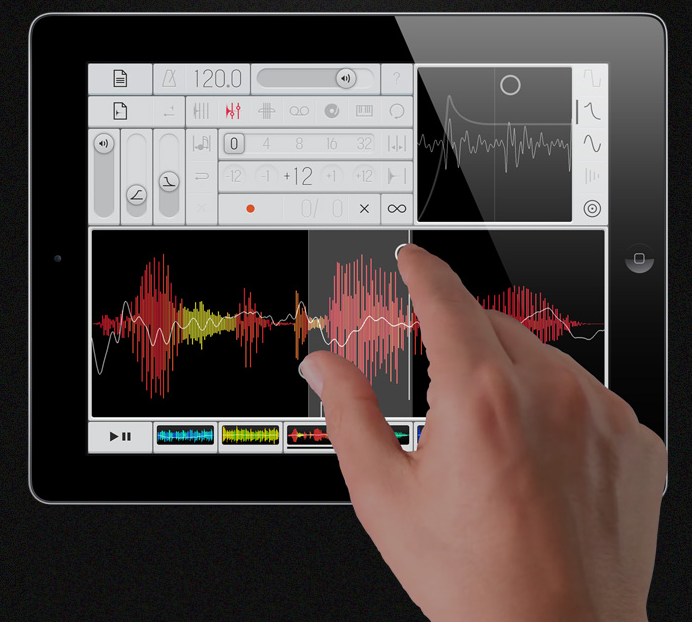
Developer Marcos Alonso has introduced Samplr – an iPad sampling instrument designed for live performance.
Unlike other apps that try to recreate real life instruments or interaction concepts from traditional computers Samplr was designed from the very beginning for Multi-Touch devices.
Here’s a video demo of Samplr:
http://www.youtube.com/watch?v=zsoXVhc-BO8
Below, an introduction to the various Samplr play modes:
http://www.youtube.com/watch?v=dJE-k_VeId4
Features:
- 7 different play modes: Slicer, Looper, E-bow, Tape, Scratch, Keyboard and Loop Player.
- 6 simultaneous samples (with 6 voices each).
- 5 sound effects per sample: Distortion, Filter, Amplitude Modulator, Feedback Delay and Reverb.
- Gesture recorder.
- High quality audio engine.
- Detailed user guide.
- Ready to use sample library.
Samplr is available in the App Store for $4.99.

amazing!
Does anybody know the app lets you load/save samples, via itunes, dropbox…?
If it has import I’m in! The ready to use library part scares me tho…
The interface has an uncanny resemblance with the OP1.
Great app though
It was my first thought too
That video is very impressive the more I watch it.
Nice! The music reminds me of Bisk!
Seems like an amazing app. But for those who wonder; it only have iTunes sharing 🙁 COME ON DELEOPERS!!!!!! STOP USING THAT CRAP!! We have perfectly good pasteboard protocols for IOS. Please, PLEASE use them. iTunes sharing makes it extremely heavy to work with. You kan NEVER do anything on the fly.
So Marcos Alonso, please put in support for pasteboard. Or at least for dropbox.
Dont have the time just now to play anymore, but will come backe later if I find anything interesting to report 🙂
I always assume missing “standard” features are coming in future updates. Most developers do that, and it makes a lot of sense to get a product to market and then update it based on user feedback over time. If you sit on a product until it’s “perfect” you will never release it.
Thats true. And I hope this is the case here aswell 🙂
I feel the same way – I would buy it in a heartbeat but the iTunes import is a total dealbreaker for me. I did that mistake with Boarderlands – great app but the iTunes import just killed it for me. Sorry.
Just picked this up. It is beautifully amazing. Great job!
What are export options?
*the
Hi, you can import your own samples throught iTunes
Audio copy/paste is coming in a future update.
Thank you for your feedback.
SAMPLR is a knockout, Alonso. There are so many clever touches: the filter that changes from low to high pass, the effects – esp. the compressor – on the individual and master channels, and the various sample playback modes. ACP will definitely be a welcome addition but right now no complaints.
If you’d build the synth equivalent of SAMPLR I’d be in pig heaven!
i bought it right away – and hooked everything up to idock and started to realise that sampler cant sample.
is this possible?
Then i will wait for that update. I really really hate the itunes way…
oh well, i bought it anyway. looks and works fantastic, but it really needs audiopaste…
Great news Marcos:) Hopefulle earlier then late then 😉 Ta for the info.
can it use the ipad mic to record stuff live?
Please implement dropbox import, like dm-1, etc.
It’s so convenient!
Ok- stop with the niggeling, this is actually something new! I’m amazed, this is a new way of playing samples, a new way of generating expression from loops- kudos, a few quid and to me it’s more fun and intuitive than Iris that cost 150 quid- the GUI is great by the way! It’s apps like (and the moog stuff) that truly render the ipad an’instrument’ in its own right.
Great app. Bought it. Can’t wait to use my own samples.
I’m in! Can’t wait for more updates! Thanks Marcos for some innovation you’ve given us.
This is a pretty versatile and fun sampler, had to pick it up too…. Looks like imports are only handled through apps->samplr->documents, and I don’t see any way to export, you can only grab a .samplr file from the documents folder and I doubt you can do anything with that. I’m running it out through audio to my DAW and seems like it will be useful that way.
Will it work with AudioBus? 😛
Looking forward to trying this out! Getting audio in is obviously a top wishlist item – nobody likes iTunes sync!
Top rated app. Amazing new way of experimenting with sound. Instant beat making, too: maybe someday we’ll get tactical hardware that would allow such creative music making (mpc feels dated now 🙂
1. Helvetica neue ultra light – not nessecerily an OP1 (to an early comment)
2. Can’t wait for audio paste
3. Export?
4. Overdubbing?
5. Solo/mute channels?
6. Song mode?
Thank you!! Great app.
7. More modulation options on vertical axis (other than volume)?
yeah overdubbing is absolutely essential, especially since you have to stop the recording before the end of the bar. it makes it near impossible to play a beat 8 bars long with beats at the end because you have to stop playing to hit the stop button. then you cant add beats in after because theres no overdub!
also if you do add overdub you should be able to record an empty measure, or be able to set the record length, so that you can create a recording at a specific length. as it stands now if you record something has no events it deletes the recording. this makes sense as long as there is no overdub, but should be changed once overdub is added.
and yes audio copy/paste and record sample are essential as well.
otherwise this is the most amazing app and the potential is infinite. im having so much fun. its so close to being perfect! great work and keep it up!
Love it can’t wait to get it
i’m sold!
sold! is what i thought, the app looks like dream. But since itunes does not even want to install, no!, it does not even want to Download (And install) on my windows pc I will unfortunatly have to wait untill there is another way of loading samples. Pity, really…
Itunes wont install on windos?? Never heard of that. I have it, it only runs damn slow. Do you know why it wont install?
Hi, no it really won’t install on my windows pc, not any version i can find. I did the troubleshooting hours some time ago (the day i got my ipad) , and recently retried, without luck. I gave up on it (a program that I really dont even want).
But my ipad needs update someday. I have an old pc in the closet wich has it installed, it was a hassle to do but i managed to do it one day. Imagine my sitting with my new ipad, which is a brick when you buy it before connecting to itunes, It took me 2 days to get it running, and there was some cursing. Yes itunes and windows, so nice. Not to mention how this program will slow things down and basicly wants my money.
Thanks for the putdown someone, when i explain my technical trouble, well it is always a precair subject, the two o.s. systems ‘We’ and ‘Them’ …
More on topic: i will get this app anyway, and try the mentioned workaround for sample import.
I used iFile on my jailbroken Ipad to copy samples from other apps. such as Beatmaker to Samplr’s folder and it worked!
cool interface, but hey, isn’t it possible to sample directly inside the program (with interface or ipad mic)?
then this program should be called romplr instead. the most basic function of a sampler is recording audio.
nice one and yes. apparently this thing can´t sample.
i love the look of it, the sound, but the live sampler without a sampling function?
bit of a paradox.
hope update brings it.
I have the same feeling about most vsti samplers. They are called samplers but they can’t actually sample.
you are right but this is actually described as live sampler. not splitting hairs – just sad i can´t use this excellent app the way i would like.
That breaks my heart. I have been looking for a Realtime Sampler for the Ipad that does this also ever since getting the Ipad one.
Direct live input of samples on the fly with the ability to then put them into any of the six slots and play with them in the different modes would make this a world class instrument. Just make a different mode for the recording and sacrifice one of the six slots if you need to.
Thanks
> Looks like imports are only handled through apps->samplr->documents
thats good to know as i understand this would make t possible to load my own audio in it without itunes. (now if I only knew how to do that with Borderlands app)
To the developer – I hope you’re getting the hint that musicians need audio copy/paste capabilities for things like this to be really useful. Same with Borderlands… its just a shame.
Just played with that for an hour.
Better importing functions and it’ll be the app of the year IMO.
Just imported some my own samples through iTunes , and it works well. Look forward to updates, this has a lot of promise.
does it have midi?
Killer app. Great bit of programming. Figured the audio copy/paste would soon come. I wish the csGrain folks would update their app with this type of functionality.
Looks good, but I’ll way until ACP is added before buying it. I don’t use iTunes much
okay, so i bought it as well. it does some crazy cool stuff.
in addition to the suggestions of audio paste and live sampling via interface or ipad mic, i think a *global* play/stop button would be great.
aif import? right now it’s only seeing wav files?
8. automation recording of slider actions? (especially repeat width)
So is this better than Loopy HD?
Are apples better than avocados?
If you’re making a pie then yes.
Wow. This is gorgeous and fun to play! Thank you for such a great piece of work, Marcos!
Interesting that more people are talking about this than even the new Elektron synth!
I thought the same thing, especially since the new Elektron synth looks so kick-ass! But, this app really does seem special… I’m very impressed.
This looks like a very nice app but there a couple of things I would look for before I considered adding yet another app to my already large ‘music creation app’ arsenal on my iPad.
So this app doesn’t have the ability to sample live input? What about midi? I have an Alesis io dock and would like to directly record my own sounds into the app and also, if possible use it with a midi controller.
Could Marcos please comment?
I think from the response it has had it will have some good money behind it to make it what we want – I have to wait till Santa comes but that’s ok Xmas remix commin !
i created this track in an hour with samplr app 😀 http://soundcloud.com/logritm/granulize-it-in-progress
i love it but maybe a better sound quality can be great 😀
https://soundcloud.com/logritm/granulize-it all sounds are made with samplr app 😀
Looks great but I can’t find a proper screenshot. Does it support the Retina display? Thanks!
yes it does! it looks great!
Two things would be nice:
– Sampling live input, as mentioned before, really mandatory for a sampler!
– Trim sample function, just discard everything outside two markers and work only with the rest
After going through the tutorial and playing around with it for about half an hour or so i can say that i really like it! I think it is a very creative and experimental app and you can make samples sound like you’ve never heard them sound before… You can layer sounds very easily and create very intesting results very intuitively. It will be nice to have other modes of importing samples (mic!) but the included samples are fun to play around with to get the hang of the app. For those waiting for the update i would say just get it now and use the preset samples to learn how to use the app because it is a little involved.
All i can say is wow, got it last nite,even went to the bother of hooking up my ipad to my crappy laptop and opening itunes, scared that it would start to do all kinds of crazy syncing etc. anyway, it was very slow but I managed to transfer some drum loops and random samples i found on the laptop. And boy was it worth te hassle, this app is a beast, so easy to use the interface, messing up breaks and creating awesome noises and melodies in no time. Recording is a bit fiddly i find and i don’t know if you could export your stuff, but tonight i’m gonna resample the results in my yamaha a4000 so i have midi!!
is from around reactable team Marcos Alonso he is one of them core team…..great stuff, but poor import options just iTUnes(Evil) Document share…..
please put /Copy&Paste/dropbox/WLAN import in it, !!!
I’m LOVING this app. One tip to make using itunes import really easy is to enable “wifi sync” on your ipad. This way, I can be using the Samplr app on a track, leave itunes open or open it without connecting my ipad, and simply select the sample I want to send to my ipad. It works really fast here. Audio Copy/Paste will be welcome but this is highly usable as is for now. Thank you for a very inpring tool!
P.S. an option to adjust the gain of each sample would be great in the future as well 🙂
addendum to my earlier post on this.
this app is *very, very cool*.
i think it’s going to be one of the top apps out there if/when some of the user suggestions are implemented.
Wonderful website. Lots of helpful info here. I am sending it to a few buddies ans additionally sharing in delicious. And of course, thank you for your effort!
can now record live 😉
I don’t get it. I export a file from logic in *.wav and just drag it in itunes onto my ipad but Samplr won’t find it anywhere. Is there any special trick I don’t know? I tried *.aiff files, too but it does not work.
MidiMidiMidiMidiMidiMidiMidiMidiMidiMidiMidiMidiMidiMidiMidiMidi…
OverdubOverdubOverdubOverdubOverdubOverdubOverdubOverdub…
…please : )
Oh! and also a kind of probability control over the slices during the random play mode (mmm… wishful thinking?)
I don’t bet it; an app called “Samplr” that cannot sample? That’s like building a great car and forgetting the gas pedal. Until this thing samples, I cannot consider it.
In the early 80s i owned one of the first affordable samplers, the Akai S612. It recorded only one second samples, and it could loop – period. I sampled everythng in sight, put them on quickdisks (the only format the 612 saved to), and sold thenlibrarybto Sam Ash. It might have been the first sample library, or at least. E of the first.
I’m dismayed that this sophisticated app cannot do what the 612 did 30 years ago.
@Sam Kanter: Why don’t you invest 3 minutes in gathering information about the current state of an app instead of writing about your invention of the sample library? ‘Samplr’ has the options of live recording and audiopaste since the 10 th of dec 2012. I’m dismayed by your ignorance.
Good share. I like that.